NewPrivate by design: no ads, no data sold

Your money, finally clear.

Limpide connects to your bank, sorts every transaction for you and shows what is left until your next pay. Want the numbers in Excel? One click.

Free plan, no time limit No credit card Made in Quebec
Connects to 10,000+ banks and credit unions in Canada and the US Encrypted, read-only connection Export to Excel and CSV
Take the tour

Everything in one calm place

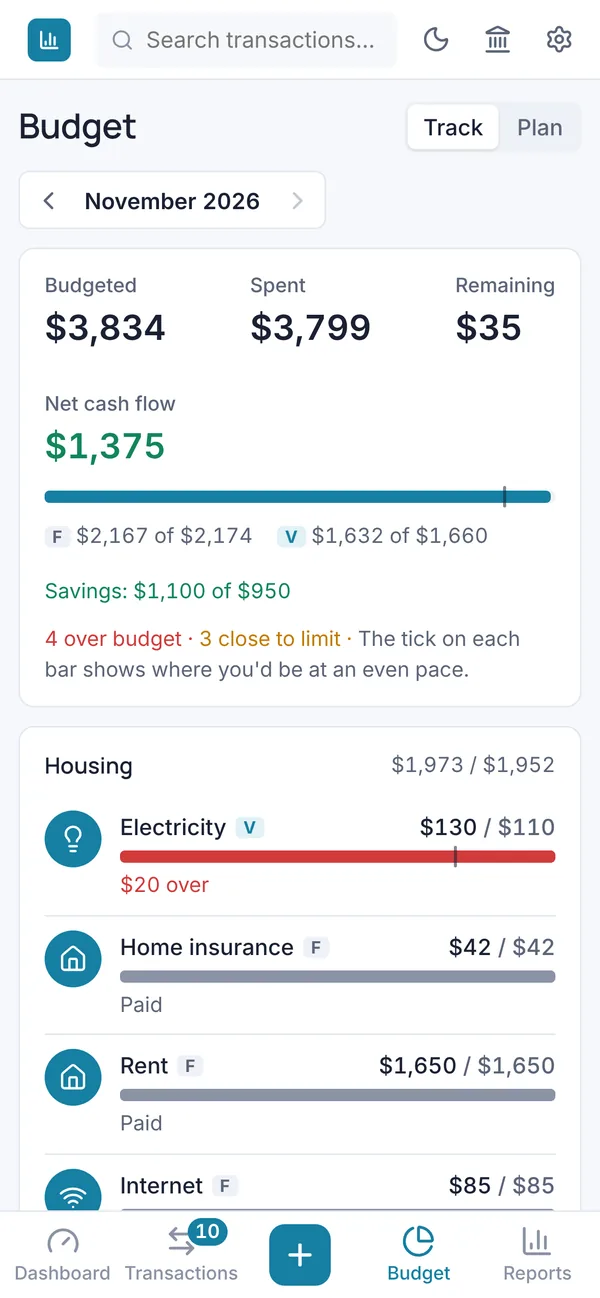
Real screens from Limpide, with sample data.

Features

Everything a spreadsheet does, without the copy and paste.

Limpide brings in your transactions, sorts them and keeps your budget up to date. You decide how it looks and how it works.

Your banks, connected in a minute

Link chequing, savings and credit cards through a secure, encrypted connection. Limpide never sees your bank password and can never move money.

  • Canadian and US banks and credit unions
  • New transactions arrive every day
  • Or import a bank file (CSV, OFX, QIF)

Categories that sort themselves

Write a rule once and it applies to every new transaction. Your bank's own labels are matched to your categories, and anything left lands in a short review list.

  • Rules you write and control
  • Bank labels mapped to your categories
  • Quick review of what is new

Export to Excel, anytime

Download one Excel workbook with all your data, in plain tables you can sort, filter and build on. Or export every transaction to CSV.

  • Full .xlsx export from Settings
  • All transactions as CSV
  • Reports to Excel in one click

Make it yours

Your own categories and groups, your own budget period, and the main color of the whole app. Light or dark mode, as you like.

Try it: pick a color to recolor this page.

  • Weekly, every two weeks, monthly or custom
  • Categories, groups and colors

Budgets and reports that make sense

Budget on your pay schedule and see each category at a glance. Net worth, cash flow and goals show how you are doing over time.

  • Savings goals and debt payoff
  • Net worth and cash flow by month

In your language

Use Limpide in English or French and switch anytime in Settings. Dates and amounts follow the language you pick.

EnglishFrançaisEspañolItalianoDeutschPortuguêsالعربية
Coming from Excel?

Keep the control. Lose the busywork.

If you already budget in a spreadsheet, you know what you want. Limpide does the repetitive part for you.

Your spreadsheet

  • Download statements and paste them in
  • Sort every line by hand
  • Fix formulas when a month has three paydays
  • Only on the computer where the file lives

With Limpide

  • Transactions arrive on their own
  • Your rules sort them as they come in
  • Budgets follow your pay schedule automatically
  • On your phone and computer, and exports back to Excel anytime
How it works

Up and running in three minutes

Create your account

An email and a password. Free, no credit card. A ready-made set of categories gets you started.

Connect your bank

Choose your bank and sign in through a secure, encrypted connection. We never see your bank password.

Check in once a week

Your transactions arrive already sorted. A few minutes a week is enough to know where you stand.

Security & privacy

Your finances are private. We keep them that way.

Your data is stored in Canada and is never sold or used for ads. You can export it or delete your account and everything in it whenever you want.

Passkeys and two-step loginSign in with your face or fingerprint, an authenticator app or an email code.
Read-only bank accessWe can see transactions, never move money. Bank connections are encrypted.
Built for Canadian privacy lawDesigned around PIPEDA and Law 25, with no trackers in the app.
Pricing

Start free. Upgrade when you want more done for you.

Basic is yours for good. Premium connects your banks. Total adds a financial assistant you can ask anything.

Basic

Everything you need to budget from bank files or by hand.

$0forever
 
  • Unlimited accounts and budgets
  • Bank file import (CSV, OFX, QIF)
  • Rules and automatic categories
  • Reports, Excel and CSV export
  • Main color, light and dark mode
  • Seven languages
  • Passkeys and two-step login
Start for free

Total

Everything in Premium, plus answers whenever you have a question.

$12/ month
Billed monthly, or yearly for the price of 10 months
  • Everything in Premium
  • Chat with a virtual financial assistant
  • Ask about your own spending in plain words
  • Help building a budget or a savings goal
  • Priority support
Choose Total

Prices in Canadian dollars. Taxes are added at checkout. Payments are processed by our reseller Paddle.com. Cancel anytime from Settings and keep full access until the end of the month you paid for. Refunds are possible within 14 days of a payment.

FAQ

Questions? Answers.

Is it really free?

Yes. Basic has no time limit and no credit card is needed. You only pay if you choose Premium, which connects your banks, or Total, which adds the financial assistant.

I'm new to budgeting. Is Limpide for me?

Yes. You start with a ready-made set of categories, so there is nothing to design before you begin. Budgets follow your pay schedule, and with Total you can ask the financial assistant whenever something is unclear.

Is my bank login safe?

You sign in to your bank through a secure, encrypted connection trusted by thousands of financial apps. Limpide never sees or stores your bank password, and its access is read-only.

What is Plaid, and why does Limpide use it?

Plaid is the company behind the secure bank connection. It links thousands of financial apps to banks in Canada and the US. When you connect a bank, you sign in on Plaid's screen, not on ours, so Limpide never sees your bank password. Plaid then sends Limpide a read-only copy of your accounts and transactions. We use it because it is encrypted, widely trusted, and works with almost every bank, so your budget stays up to date without any typing.

Which banks are supported?

With Premium or Total, most Canadian and US banks and credit unions, including Desjardins, RBC, TD, BMO, Scotiabank and National Bank. On any plan, you can import a file from your bank or add transactions by hand.

Can I get my data out?

Yes, on every plan. In Settings, download an Excel workbook with everything Limpide has, or all your transactions as a CSV file.

Can I cancel or delete my data?

Anytime, in one click from Settings. When you cancel, you keep full access until the end of the month you paid for. Deleting your account removes your data and disconnects your banks.

Is there a mobile app?

The website works great on your phone today, and Android and iPhone apps are on the way.
See your money clearly, starting today.

Three minutes to set up. Free, with no credit card.

Create your free account